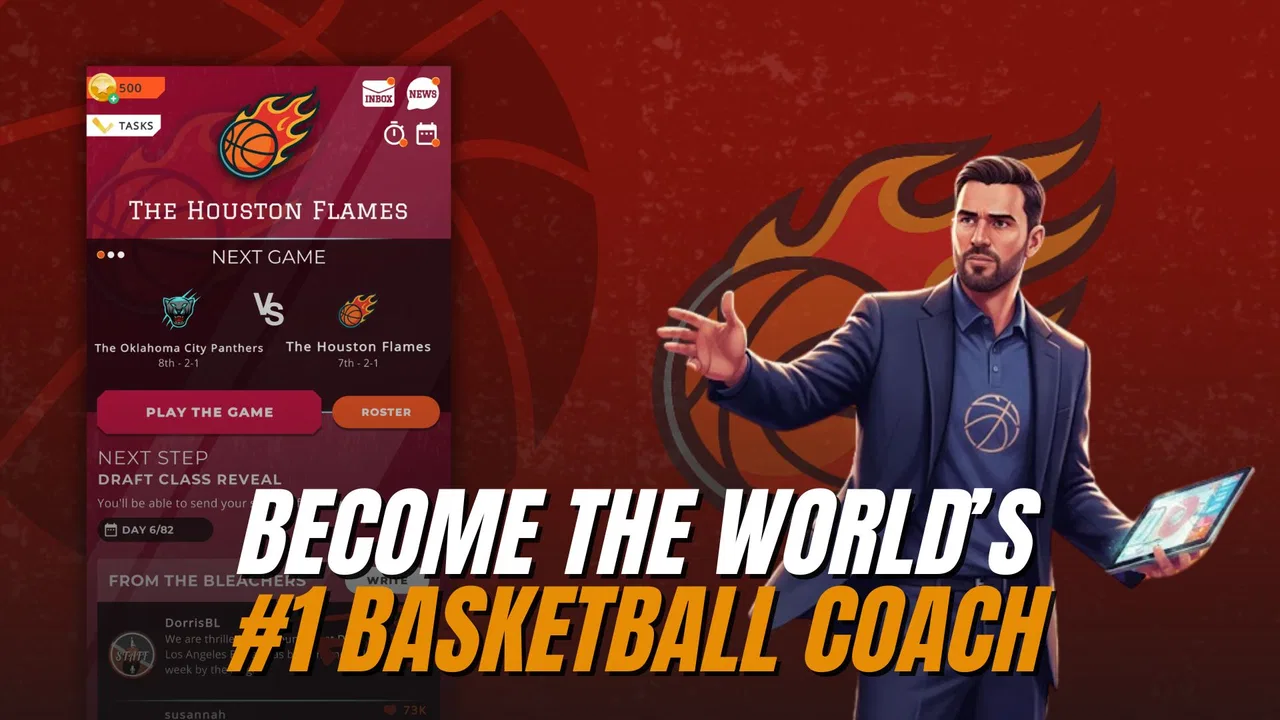
Astonishing Basketball Manager
- 4.5
- Rating
- 1.00M
- Installs
- Free
- Price

 Analysis by App-foxy
I first approached Astonishing Basketball Manager as a quick basketball game for spare moments, but its appeal became clearer when I treated it as a shared household activity. One person can enjoy the role of coach and general manager, while another may prefer making decisions as a franchise player. That flexibility makes it easier to recommend to people with different levels of interest in basketball, although it is still a simulation rather than a simple pick-up-and-play arcade game.
Studio Zero Games has built the experience around the idea that basketball can be enjoyed from several viewpoints. You are not locked into one narrow role. The store summary presents it as a simulation in which you can act as the ultimate coach and GM or control a franchise player, and that distinction matters in everyday use. I found myself switching between long-term planning and the more personal feeling of guiding a player’s career, depending on how much time I had.
It is free to download, rated for Everyone, and available for devices running Android 7.1 or later. The game has reached over a million installs and holds a 4.5 average from roughly twelve thousand ratings, with about a thousand written reviews. Those figures suggest a healthy audience, but they do not remove the need to understand what kind of basketball experience this actually is: a management-focused simulation with player-centered options, not a replacement for a traditional live-action basketball game.
You May Also Like

 Google Keep - Notes and lists
Google Keep’s Quiet Growth Shows the Appeal of Simpler Notes
As mobile work gets busier, Google Keep keeps winning a simple contest: capture a thought quickly, find it later, and get on with the day.

 Blood Strike: 2.5 Anniversary
Blood Strike’s Loadouts Turn Every Drop Into a Tactical Gamble
A close look at Blood Strike’s custom loadouts: how fast access to signature weapons reshapes its battle royale rhythm, rewards preparation, and narrows the gap between fights.

 Pandora - Music & Podcasts
Pandora’s Music Is Easy to Start, but Harder to Recover
Pandora’s strength is its low-effort path from a seed to a station. Its weak spot is how much confidence it asks you to place in connection, setup, and quiet recovery.

 8 Ball Pool
 Is Built on Rivalries, Rematches, and Routine
A close look at the rivalries, rematches, shared routines, and unanswered safety questions that turn a quick pool match into a persistent mobile community.

 Samsung Music
’s Quiet Strength Is Playing What You Already Own
Its reach comes less from spectacle than from dependable access to a personal library. That simplicity is both the app’s strongest retention engine and its ceiling.

 AccuWeather: Weather Radar
AccuWeather Review: A Quick, Clear Forecast for Everyday Decisions
For everyday plans, the best forecast is the one you can understand quickly. AccuWeather makes rain timing, radar, and local conditions easy to act on, with a few trade-offs.
More From Our News Desk



How the game works in a shared household
When I think about how this game fits into a shared household, I’d focus less on who gets the device and more on agreeing what each person wants from a session. A quick check-in before changing the team or player’s direction can keep casual play welcoming for everyone, while still leaving room for individual opinions. That shared routine also makes it easier to notice whether the group enjoys planning together or would rather take turns independently.
A useful game for different kinds of basketball fans
In a household where people share a phone or tablet, the most practical strength is that the game does not demand the same style of play from everyone. A basketball fan who enjoys decisions, planning, and team direction can take the coach or GM perspective. Someone else may be more interested in following one franchise player and seeing how that role feels over time. That gives the game more room to fit around a family’s habits than an experience built only around rapid matches.
A realistic scenario would be a parent checking the team during a short break, then handing the device to a teenager who wants to make the next player-focused decision. The handoff works best when each person agrees on what they are changing before touching the game. Otherwise, a shared save can quickly become confusing: one person may be pursuing a careful team plan while another makes a choice for immediate excitement.
I would not treat one shared progress path as a substitute for separate personal profiles. The important practical boundary is simple: if several people want meaningful control over the same team or career, decide in advance who is responsible for major choices. If the game is installed on a family device, keeping a small note outside the app can help record the intended strategy, especially when more than one person plays at irregular times.
Why the management angle changes the experience
The management side rewards patience more than reflexes. Instead of asking you to win through fast finger movements alone, it encourages you to think about direction, priorities, and the consequences of decisions. That makes it a good fit for a quiet evening, a commute, or a short planning session when you want something more thoughtful than an arcade match.
The franchise-player option provides a different rhythm. It gives the experience a more personal focus, which can be easier for a younger or less management-oriented player to understand. A child who does not care about running an entire organization may still enjoy following one player’s path. An adult who prefers strategy may find the broader team role more satisfying.
My main caution is that the game’s appeal depends on enjoying simulation decisions. If you want direct control of every possession, dramatic on-court action, or a quick competitive match against another person, this is probably not the right choice. A conventional basketball arcade game will feel more immediate. A full console-style sports title will usually offer deeper presentation and real-time control. This game earns its place by making the planning layer the center of attention.
Setup boundaries before anyone starts playing
Before installing it on a shared device, I would first check whether the operating system meets the Android 7.1 minimum. That is a small step, but it prevents an avoidable problem when an older household phone is being reused. The current version is 6.4.5, so it is also sensible to keep the installation updated through the normal app store process rather than assuming an old copy will behave the same way.
The free entry point makes trying it straightforward, but the in-app purchase range runs from forty-nine cents to twenty-nine dollars and ninety-nine cents per item. That is the detail I would discuss openly before letting a child or guest play on a device connected to a payment method. The game is free to start, yet optional purchases can still create household friction if nobody has agreed on a rule beforehand.
I would establish three boundaries before the first session. First, decide whether the device is being used for one shared career or for separate play sessions. Second, agree that purchases require permission from the device owner. Third, decide whether younger players may make strategic changes without checking with the person managing the main save. These are not complicated rules, but they prevent the most common form of disagreement: one player believing a decision was temporary while another sees it as permanent progress.
Because the game is rated Everyone, it is an approachable choice in terms of age category. That rating should not be mistaken for a complete household policy, though. Age suitability and spending suitability are different questions. A child may be perfectly comfortable with the basketball concepts while still needing an adult rule around purchases and shared progress.
Coordinating decisions without turning play into homework
Shared play becomes more enjoyable when each person has a clear role. One player can focus on the broader team direction, another can follow the franchise-player side, and a third can simply observe and offer opinions. I found that this works better when the group treats the game like a small discussion rather than passing the device around without explanation.
A helpful routine is to say what you intend to do before confirming a major decision. For example, explain whether the next move is meant to support long-term team stability or to create a more exciting short-term challenge. That simple pause gives another household member a chance to understand the plan and makes the game feel collaborative rather than competitive inside the home.
Another useful habit is to separate “experiment” sessions from the main household run. If someone wants to try an unusual approach, do it only after agreeing that the shared save is being used for experimentation. This matters particularly when one person enjoys testing possibilities and another wants a consistent career narrative. The game is more forgiving as a conversation when everyone knows what kind of session is taking place.
I also recommend limiting advice to decisions that match the player’s interest. A younger player may enjoy choosing the direction of a franchise player, while an experienced fan may want to talk about broader team management. Explaining every management detail can make the game feel like an assignment. Letting each person own a manageable part of the experience keeps the household involvement relaxed.
What the age rating means in everyday use
The Everyone rating makes this easier to introduce across age groups, especially when a family wants a sports-themed game without requiring advanced controls. The central ideas—basketball, player development, coaching, and management—are familiar enough for casual discussion. I can imagine it working well as a parent-and-child conversation game, where the adult asks why a particular decision seems better and the child explains the reasoning.
Still, younger players may need help understanding that simulations often involve delayed results. A decision may not feel rewarding immediately, and the best move may not be the most exciting one. That is a useful lesson in itself, but it can also create frustration if someone expects constant action. I would introduce it as a strategy game with basketball themes, not as a fast sports game.
Trust is especially important when the device belongs to someone else. I would make sure children know which actions are allowed and which require an adult’s approval. Since the game includes optional purchases, I would not rely on the age label alone as the household’s entire safety plan. A clear rule about spending is more useful than assuming the rating answers every question.
Where the free model helps and where it can distract
Being free makes the game easy to test with a household. You can see whether the management style suits everyone before committing money to a premium sports title. That is valuable because simulation games are personal: one player may become absorbed in planning while another may lose interest if there is not enough direct action.
The trade-off is the presence of in-app purchases. Even when nobody intends to buy anything, the possibility can change how a shared device is handled. I would treat the free version as a trial of the game’s core appeal and set a firm spending boundary before play begins. If the household dislikes discussing purchases, a paid game with a clear upfront cost may be a more comfortable alternative, even if it offers less flexibility for trying the experience first.
The purchase range also makes it important not to judge the game only by its free label. Free access is convenient, but the household should decide whether optional spending is acceptable rather than leaving that decision to whoever happens to be holding the device. That is a practical consideration, not a criticism of the basketball design itself.
How it compares with familiar basketball alternatives
Compared with arcade basketball games, this title is slower and more reflective. Arcade alternatives are better when you want immediate control, quick rounds, and a sense of physical action. I would choose one of those for a short session with a player who does not enjoy menus, planning, or long-term consequences.
Compared with large console or PC basketball simulations, this mobile game is more convenient and easier to bring into a household routine. You can check it without setting up a dedicated gaming space, and its coach, GM, and franchise-player perspectives give it a broader identity than a game focused purely on on-court performance. The compromise is that mobile convenience does not automatically provide the same depth of presentation, control precision, or visual spectacle as a major platform release.
Compared with a spreadsheet-style management game, the basketball framing makes the decisions more approachable. You are not managing an abstract business; you are following a sport and its people. That helps when introducing the game to someone who likes basketball but has never tried a management simulator. On the other hand, a specialist management game may be preferable for a player who wants the most detailed administrative experience possible.
Small habits that make the game more enjoyable
My first practical tip is to avoid making every session about immediate success. Use some sessions to understand the direction of the team or player, then make changes with a clear reason. This reduces the temptation to undo decisions constantly and gives the simulation a stronger sense of progression.
My second tip is to match the role to the player. Give the strategy-minded person the coach or GM perspective, and let the person who prefers a personal story focus on the franchise-player path. This is more than a division of labor; it prevents the shared experience from becoming a contest over who gets to control everything.
My third tip is to keep purchase decisions outside the excitement of play. If a household is open to spending, agree on the rule before anyone reaches a tempting moment. If the household is not open to spending, say that clearly and keep the game as a no-purchase activity. The price range—from forty-nine cents to twenty-nine dollars and ninety-nine cents per item—makes that conversation worth having.
My fourth tip is to use the game as a discussion starter rather than expecting every player to understand it alone. Ask what a person is trying to achieve, what trade-off they see, and whether they prefer a team-wide or player-focused challenge. That approach makes the management layer easier to learn and gives younger players a way to participate without needing to master every option immediately.
Who should play it and who should skip it
I would recommend it to basketball fans who enjoy imagining themselves behind the scenes, people who like career-style progression, and households looking for a sports game that can be discussed and shared. It is especially suitable for players who appreciate making choices at their own pace rather than relying on rapid reactions.
I would skip it if your ideal basketball game means controlling every movement during a live match. I would also look elsewhere if you want a completely purchase-free household experience and do not want to establish spending rules. Finally, players who dislike revisiting plans or waiting for decisions to develop may find the simulation structure less satisfying than a direct arcade alternative.
For me, the strongest use case is a shared device where two people have different basketball interests. One can think like a team builder, while another follows the identity of a franchise player. That combination gives the game a social value that is easy to miss when viewing it only as a solo sports title.
My household verdict
Astonishing Basketball Manager works best when everyone understands that it is a basketball simulation built around choices, not a rapid-fire action game. Studio Zero Games gives it enough role flexibility to support both broad team management and a more personal franchise-player experience. That makes it easier to fit into a household with mixed tastes, provided players agree on shared progress and spending before they begin.
The free download is a genuine advantage for testing the idea, while the Everyone rating makes it approachable for a wide age range. The important caveat is that optional purchases, shared saves, and different expectations can create more friction than the game itself. Clear household boundaries solve much of that problem.
After spending time with it, I see it as a good recommendation for a friend who likes basketball strategy, career progression, and thoughtful decisions on a phone. I would point an action-focused player toward a conventional basketball game instead. For a family or group sharing one device, my advice is simple: assign responsibilities, discuss purchases, and let each person enjoy the role that suits them. With those boundaries in place, Astonishing Basketball Manager becomes a surprisingly flexible way to bring basketball conversations into everyday downtime.
FAQs for Astonishing Basketball Manager
01What is Astonishing Basketball Manager?
Astonishing Basketball Manager is a basketball management and simulation game in which you take control of a team rather than directly controlling players on the court. You are responsible for building a roster, choosing tactics, managing finances, developing talent, and guiding your club through competitive seasons. It is designed for users who enjoy strategic decision-making, statistics, and long-term team planning.
02How does the gameplay work in Astonishing Basketball Manager?
The game focuses on management decisions before and during matches. You can scout and sign players, adjust lineups, assign roles, select offensive and defensive strategies, and respond to the strengths of opposing teams. Matches are generally experienced through simulation and management feedback, so success depends more on preparation, tactical choices, player form, and roster balance than on real-time controls or arcade-style action.
03Is Astonishing Basketball Manager suitable for beginners?
Astonishing Basketball Manager can be enjoyed by beginners, although its many menus, statistics, player attributes, and management options may feel overwhelming at first. New players should take time to review the tutorials or introductory explanations, experiment with simple tactics, and avoid making too many roster changes immediately. Basketball fans familiar with management games will likely understand the systems more quickly.
04Does Astonishing Basketball Manager require an internet connection?
Internet requirements can depend on the version, platform, and specific features available in the game. Some management activities may be playable offline, while updates, cloud functions, online competitions, advertisements, or connected services can require an internet connection. Before downloading, check the current Google Play Store or App Store listing because requirements and supported features may change with future updates.
05Is Astonishing Basketball Manager free to download, and are there in-app purchases?
The game may be available as a free download, but availability, pricing, advertising, and in-app purchases can vary between Android and iOS. Optional purchases may provide extra resources, convenience, or premium content, depending on the current edition. Players who prefer a completely free experience should review the store description and payment information carefully before installing, especially if children will be using the device.
Pros
- Deep roster management with meaningful lineup and rotation decisions.
- Multiple leagues and competitions provide long-term progression goals.
- Matches are quick to follow
- making it suitable for short play sessions.
- Player development adds strategy beyond simply signing the best athletes.
- Clean interface makes most management tools easy to find.
Cons
- Limited visual match presentation may feel basic to some players.
- Progress can become repetitive once familiar with the management systems.
- Advanced features may take time to understand for casual basketball fans.
- Some progression elements may encourage frequent
- routine check-ins.
- The experience is less appealing if you prefer direct on-court control.

Astonishing Basketball Manager
Gallery